Configuration
Hardware Configuration Files
The hardware configuration files define the instruments and sensors read
out by pyhkd. Configuration data is stored in the JSON5 format,
which is a superset of the JSON specification that added human-features
such as comments; valid JSON is always valid JSON5, but the reverse is
not true. A valid pyhkd hardware configuration file consists of a
single list of objects, with each object corresponding to an instrument.
[
    {
        "type": "a",
        "param0": "value0",
        "param1": 1.0
    },
    {
        "type": "b"
    }
]
boolean:
trueorfalse(but nottrueorfalse)integer: an integer value not enclosed in quotation marks (
4but not4or4.0)float: a number without quotation marks in decimal or exponential form (
4,8.0,-1.234e5but not-1.234e5), or the valuesInfinity,-Infinity, andNaN(as allowed in the JSON5 specification)string: ASCII characters enclosed in double quotation marks (
valuebut notvalue)list: A list of items enclosed in square brackets.
object: A set of “key”:“value” pairs enclosed in curly brackets.
Abstract Devices
This section documents some of the parameters common to abstract classes of devices.
Channel
Identifier: Channel
Parameters specified for a channel, which is a named timestream with one or more channel types.
string or integer
id– The hardware-facing identifier for the channel. It is used to match channel objects to the channels reported by the device, and therefore the form and allowed values vary between devices. For many instruments this is an integer starting from 0; for such instruments, theidis not explicitly required in thepyhkdconfiguration file and is implied by the ordering of the channel list. Other instruments use string identifiers and therefore must be explicitly provided in the configuration. Generally, the list of channels for a single instrument should specify anidfor all channels or for no channels.string
name– The human-facing identifier for the channel. This must be globally unique, no two channels in your entire hardware config file can share a name. The name (along with the type) is the primary link between yourpyhkwebandpyhkdconfig files, it is shown to the user inpyhkwebplots or tables, and it is URL-encoded to form the name of the main timestream log files. Spaces, capital letters, and ASCII special characters are allowed, so it is encouraged to chose human-understandable names.string
alias– If provided, the alias is treated as a second name for the channel (data is stored only once, the alias log files are symlinks to the main log files). The alias shares all of the same restrictions as the name (the alias cannot match any names or aliases in your system). The alias is useful in situations where you need to refer to the same channel by different names in different contexts.string
calib_func– A string with the name of one of the calibration files stored inpyhk/pyhkd/calib(without the file extension, such asV2T_DT400). How (and whether) the calibration function is used depends on the instrument. See the Calibration section for more details.boolean
save_deriv– Iftrue, save the derivative of the channel as a separate channel.integer
downsample– If a number greater than 1 is provided, this is the number of samples to bin together. Data will be stored to the disk at the reduced rate.boolean
save_fast– Iftrueand \(\texttt{downsample}>1\), the full-rate data will be stored along side the reduce-rate data. The fast rate data will be available for export, but the slow data will be plotted bypyhkwebby default.float
filter– A value between 0 and 1 indicating the alpha parameter for an exponential moving average filter applied to the measured values. The default value of 1.0 produces an unfiltered result.float
r_heater– Relevant only for voltage output instruments. It defines the resistance of the load and is used to compute power values.float
r_total– Relevant only for voltage output instruments. It defines the resistance of the load plus the wiring and is used to compute power values.string or list
type– A string indicating the data type for the channel (ex:voltage). Note that for most devices the channel type is implied by the channel id and does not need to be explicitly listed in the configuration file. A channel can have multiple unique types which be be specified with a list of types (ex:[voltage, current]) or via a special multi-type strings listed below. A special class of target-types (ex:vtargfor voltage) corresponds to channels that are set by the user and sent to the hardware instead of read from the hardware. For example, a power supply with one output channel may have the type[voltage, current, vtarg], which allows a user-commanded voltage, a measured voltage, and a measure current all sharing one channel name. Note that the units specified are the units for data stored in files; plots and tables inpyhkwebcan convert to other compatible units.Single Types:
temperature[K]voltage[V]resistance[Ohms]current[A]currentramp[A/s] – A current ramping ratepower[W]bfield[T] – Magnetic fieldpressure[Torr]relhumidity[%] – Relative humidityenergy[J]frequency[Hz]time[s]adu[dimensionless] – The count from an ADCdac[dimensionless] – The count from a DACangle[deg]Any of the above types with
derivadded to the end is a valid type representing the time derivative of the type in questionfloat[dimensionless] – A generic numbernumber[dimensionless] – A generic number, typically an integer or countfraction[dimensionless] – A generic number, typically a fraction from 0 to 1state[dimensionless] – A number representing the state of an object or quantityunused– Channel is ignored and not recorded to disk, even if reported by the hardware
Target Types:
vtarg[V] – Target voltageptarg[W] – Target powerttarg[K] – Target temperatureitarg[A] – Target currentirtarg[A/s] – Target current ramp ratestarg[dimensionless] – Target state valueoutputmode[dimensionless] – A special target type used by voltage output systems to track whether it is setting voltage or power (converted to voltage via provided resistances).
Multi-Types:
thermometer:diode– A voltage-based thermometer. Equivalent to[voltage, temperature].thermometer:diode:exc– A voltage-based thermometer with a measured excitation current and dissipated power. Equivalent to[voltage, temperature, current, power].thermometer:resistor– A resistance-based thermometer. Equivalent to[resistance, temperature].thermometer:resistor:exc– A resistance-based thermometer with a measured excitation current and dissipated power. Equivalent to[resistance, temperature, voltage, current, dac].heater– A basic voltage-output heater. Equivalent to[voltage, vtarg, outputmode].heater:imon– A heater with current monitoring. Equivalent to[voltage, vtarg, current, outputmode].heater:setp– A heater that can accept power targets (converted inpyhkdto voltage values, requires specified resistances). Equivalent to[voltage, power, outputmode, vtarg, ptarg].heater:setp:imon– A heater with current monitoring that can accept power targets. Equivalent to[voltage, current, power, outputmode, vtarg, ptarg].heater:setpt:imon– A heater with current monitoring that can accept power and temperature targets. Equivalent to[voltage, current, power, temperature, outputmode, vtarg, ptarg, ttarg].
Instrument
Identifier: Instrument
Parameters common to all devices that report results for some number of channels.
list
channels– A list of zero or more channel parameter objects. Typicially instruments expect fixed channel counts and types, see the instrument in question for more details.float
wait_time– Where relevant, this specificies the approximate time in seconds between instrument data requests/updates.string
default_sensor_type– The default value oftypeused for channels that do not specify it. This is typically defined by the instrument and does not need to be specified.string
default_calib_func– The default value ofcalib_funcused for channels that do not specify it.string
default_downsample– The default value ofdownsampleused for channels that do not specify it.string
default_save_deriv– The default value ofsave_derivused for channels that do not specify it.string
default_save_fast– The default value ofsave_fastused for channels that do not specify it.boolean
verbose_rx– Iftrue, any relevant debugging information about data received from the instrument will be printed in the program log. Defaults tofalse.boolean
verbose_tx– Iftrue, any relevant debugging information about data sent to the instrument will be printed in the program log. Defaults tofalse.boolean
verbose_fail– Iftrue, any relevant debugging information about failures with the instrument will be printed in the program log. Defaults totrue.boolean
verbose_raw– Iftrue, any relevant debugging information about raw or low-level communication with the instrument will be printed in the program log. Defaults tofalse.
Serial Instrument
Identifier: SerialInstrument
Parameters common to devices that communicate over a (real or virtual) serial port.
Inherits parameters from
Instrumentstring
port– The serial port identifier (ex:/dev/ttyUSB0)integer
baudrate– The serial port communication speed (ex:9600)string
pkt_end– The packet termination string, used in both sending and receiving data (ex:\n,\r\n,end;). Typically this is set by the inheriting instrument and does not need to specified in the configuration file.string
pkt_start– The string signifying the start of a packet (or an empty string), used in both sending and receiving data (ex:start:,{). Typically this is set by the inheriting instrument and does not need to specified in the configuration file.integer
bytesize– The serial byte size. Valid entries are8(default),7,6, and5. Typically this is set by the inheriting instrument and does not need to specified in the configuration file.integer
stopbits– The number of serial stop bits. Valid entries are1(default) and2. Typically this is set by the inheriting instrument and does not need to specified in the configuration file.
GPIB SCPI Instrument
Identifier: GPIBSCPIInstrument
Parameters common to devices that communicate over a GPIB bus.
Inherits parameters from
Instrumentinteger
address– The GPIB bus address, from 0 and 31 (ex:12)
Devices
Supported devices are listed below:
Prologix GPIB-USB Adapter
Identifier: prologix
The Prologix GPIB-USB 6.0 adapter, acting as the controller-in-charge on a GPIB bus.
Example:
{
    "type": "prologix",
    "port": "/dev/ttyPrologix",
    "subdevices": []
}
Supported Parameters:
Inherits parameters from
SerialInstrumentlist
subdevices– A list of subdevice objects that represent instruments connected to the GPIB bus. Supported subdevices are found in the Subdevices section.
Simulated Data
Identifier: simdata
A fake instrument that generates a random walk output on each channel
with a data period of wait_time. Accepts any number of channels.
Example:
{
    "type": "simdata",
    "wait_time": 1.0,
    "channels":
    [
        {"name": "AI0", "type": "voltage"},
        {"name": "AI1", "type": "voltage"}
    ]
}
Supported Parameters:
Inherits parameters from
Instrumentinteger
delta_sync– If provided, a sync number will be generated and stored for each data update. The sync number will increase bydelta_synceach frame.
Cryomech PT Compressor
Identifier: ptcompressor
The helium compressor for a Cryomech PT410 or PT415 pulse tube. This
device contains an internal channel list which generates its names from
the name_prefix parameter.
Example:
{
    "type": "ptcompressor",
    "port": "/dev/ttyPTC",
    "name_prefix": "PT"
}
Supported Parameters:
Inherits parameters from
GPIBSCPIInstrument(exceptchannels)string
name_prefix– The string used to generate the names for the fixed internal channel list.
Internal Channels:
{'name':name_prefix+' Compressor Minutes', 'type':'state'},
{'name':name_prefix+' Status', 'type':'state'},
{'name':name_prefix+' Error', 'type':'state'},
{'name':name_prefix+' H20 In', 'type':'temperature'},
{'name':name_prefix+' H20 Out', 'type':'temperature'},
{'name':name_prefix+' Helium', 'type':'temperature'},
{'name':name_prefix+' Oil', 'type':'temperature'},
{'name':name_prefix+' Avg High', 'type':'pressure'},
{'name':name_prefix+' Avg Low', 'type':'pressure'},
{'name':name_prefix+' Avg Delta', 'type':'pressure'},
{'name':name_prefix+' High Derivative', 'type':'pressure'},
{'name':name_prefix+' Motor Current', 'type':'current'}
Lake Shore 218
Identifier: ls218
Lake Shore 218 voltage-based thermometer readout instrument, connected via a RS232 (also supported over GPIB, see the Subdevices section).
Example:
{
    "type": "ls218",
    "port": "/dev/ttyLS218b0",
    "channels":
    [
        {"name": "50K Head", "calib_func": "V2T_D6068569"},
        {"name": "50K Strap Cold", "calib_func": "V2T_D6064732"},
        {"name": "50K Strap Warm", "calib_func": "V2T_D6070412"},
        {"name": "50K Plate", "calib_func": "V2T_D6070415"},
        {"name": "4K Plate", "calib_func": "V2T_D6070300"},
        {"name": "4K Fridge Bracket", "calib_func": "V2T_D6070404"},
        {"name": "4K Strap Warm", "calib_func": "V2T_D6069937"},
        {"name": "4K Strap Cold", "calib_func": "V2T_D6068568"}
    ]
}
Supported Parameters:
Inherits parameters from
SerialInstrument
MKS Pressure Sensor
Identifier: mks_pressure
MKS pressure sensors including 972B DualMag and 902B
Example:
{
    "type": "mks_pressure",
    "port": "/dev/ttyTurbo",
    "channels":
    [
        {"name": "Turbo Station", "type": "pressure"}
    ]
}
Supported Parameters:
Inherits parameters from
SerialInstrument
Arduino
Identifier: arduino
An Arduino or Arduino-compatible device running the firmware included in
pyhk/firmware/arduino-digital-out, which provides pyhkd access
to the digital output pins. This instrument accepts any number of
channels, each of which has the type [state,starg] with state values
of 1 or 0 corresponding to digital high and low respectively.
The id parameter is an integer matching the Arduino pin number in
question. Note that a relay shield can be used with the Arduino to drive
higher power lines.
Example:
{
    "type": "arduino",
    "port": "/dev/ttyArduino",
    "channels":
    [
        {"id":7, "name": "PTC Relay"},
        {"id":6, "name": "Relay 2"},
        {"id":5, "name": "Relay 3"},
        {"id":4, "name": "Relay 4"}
    ]
}
Supported Parameters:
Inherits parameters from
SerialInstrument
HKMBv2 AC Cernox Readout
Identifier: hkmbv2
TIME-style AC excitation housekeeping data acquisition box. Matches readings to MCE sync numbers and IRIG-B timestamps if provided.
Example:
{
    "type": "hkmbv2",
    "port": "/dev/ttyHKMBv2Box0",
    "serial_num": 0,
    "live_config_filename": "hkmbv2_time.json",
    "channels":
    [
        // 8 analog inputs are supported with IDs AI0-AI7
        {"id": "AI0", "name": "Piezo PT Motor", "type": "voltage"},

        // 24 heaters are supported with IDs H00-H23
        {
            "id": "H00", "name": "Pump 3 Heater",
            "type": "heater:setpt:imon",
            "r_heater": 207, "r_total": 229.3
        },

        // 24 thermometers are supported with IDs Tnm for n 0-5 and m 0-4
        {
            "id": "T00", "name": "350mK Filter",
            "calib_func": "R2T_CX69935",
            "type": "thermometer:resistor:exc"
        },

        // System monitors
        {"id": "A5V", "name": "HKMBv2b0_A5V", "type": "voltage"},
        {"id": "12V", "name": "HKMBv2b0_12V", "type": "voltage"},
        {"id": "3V3", "name": "HKMBv2b0_3V3", "type": "voltage"},
        {"id": "1V8", "name": "HKMBv2b0_1V8", "type": "voltage"},
        {"id": "6V0", "name": "HKMBv2b0_6V0", "type": "voltage"},
        {"id": "14V", "name": "HKMBv2b0_14V", "type": "voltage"},
        {"id": "24V", "name": "HKMBv2b0_24V", "type": "voltage"},
        {"id": "D5V", "name": "HKMBv2b0_D5V", "type": "voltage"},
        {"id": "FPS", "name": "HKMBv2b0_FPS", "type": "frequency"},

        // MCE sync number monitor
        {
            "id": "SYNC", "name": "HKMBv2b0_SYNC",
            "type": ["number","frequency","time"]
        },

        // Environment monitors
        {
            "id": "ENV", "name": "Ambient",
            "type": ["temperature", "pressure", "relhumidity"]
        },
        {
            "id": "DEW", "name": "Ambient Dew Point",
            "type": "temperature"
        }
    ]
}
Supported Parameters:
Inherits parameters from
SerialInstrumentstring
live_config_filename– The file name (not path) to use for an automatically-generated JSON configuration file. This configuration file should not be manually edited or created and should not be reused for other systems. This filename should match the one listed in thepyhkwebconfiguration file for the HKMB settings page.
HKMBv1 DC Diode/Resistor Readout
Identifier: hkmbv1
TIME-style DC excitation housekeeping data acquisition box. Matches readings to MCE sync numbers and IRIG-B timestamps if provided.
Example:
{
    "type": "hkmbv2",
    "port": "/dev/ttyHKMBv2Box0",
    "serial_num": 0,
    "live_config_filename": "hkmbv2_time.json",
    "channels":
    [
        // 10 analog inputs are supported with IDs AI0-AI9
        {"id": "AI0", "name": "Piezo PT Motor", "type": "voltage"},

        // 2 4-20mA inputs are supported with IDs II0-II1
        {"id": "II0", "name": "JT Injection", "type": "current"},

        // 32 heaters are supported with IDs H00-H31
        {
            "id": "H00", "name": "Pump 3 Heater",
            "type": "heater:setpt:imon",
            "r_heater": 207, "r_total": 229.3
        },

        // 36 thermometers are supported with IDs Tnm for n 0-8 and m 0-4
        {
            "id": "T00", "name": "350mK Filter",
            "calib_func": "R2T_CX69935",
            "type": "thermometer:diode:exc"
        },

        // 4 fixed reference resistor channels with IDs TT0-TT3
        {
            "id": "TT0", "name": "HKMBv1b0_TT0",
            "type": "thermometer:resistor:exc"
        },

        // 8 digital frequency-counter inputs with IDs FM0-FM7
        {"id": "FM0", "name": "HKMBv1b0_FM0", "type": "frequency"},

        // System monitors
        {"id": "VM0", "name": "HKMBv1b0_P2V5", "type": "voltage"},
        {"id": "VM1", "name": "HKMBv1b0_N2V5", "type": "voltage"},
        {"id": "VM2", "name": "HKMBv1b0_P5V", "type": "voltage"},
        {"id": "VM3", "name": "HKMBv1b0_N5V", "type": "voltage"},
        {"id": "VM4", "name": "HKMBv1b0_24V", "type": "voltage"},
        {"id": "VM5", "name": "HKMBv1b0_15V", "type": "voltage"},
        {"id": "VM6", "name": "HKMBv1b0_12V", "type": "voltage"},
        {"id": "VM7", "name": "HKMBv1b0_3V3", "type": "voltage"},
        {"id": "FPS", "name": "HKMBv2b0_FPS", "type": "frequency"},

        // MCE sync number monitor
        {
            "id": "SYNC", "name": "HKMBv2b0_SYNC",
            "type": ["number","frequency","time"]
        }
    ]
}
Supported Parameters:
Inherits parameters from
SerialInstrumentstring
live_config_filename– The file name (not path) to use for an automatically-generated JSON configuration file. This configuration file should not be manually edited or created and should not be reused for other systems. This filename should match the one listed in thepyhkwebconfiguration file for the HKMB settings page.
HKMB Mini ADC Board
Identifier: hkmbminiv1
TIME-style data acquisition box used for voltage measurement (no thermometer excitation). Matches readings to MCE sync numbers and IRIG-B timestamps if provided.
Example:
{
    "type": "hkmbminiv1",
    "port": "/dev/ttyHKMBMini0",
    "channels":
    [
        // 5 analog inputs are supported with IDs V10/V20/V30/V40/V50
        {"id": "V00", "name": "Sensor 0", "type": "voltage"},

        // System monitor
        {"id": "FPS", "name": "HKMBMINI_FPS", "type": "frequency"},

        // MCE sync number monitor
        {
            "id": "SYNC", "name": "HKMBMINI_SYNC",
            "type": ["number","frequency","time"]
        },

        // Environment monitors
        {
            "id": "ENV", "name": "Ambient",
            "type": ["temperature", "pressure", "relhumidity"]
        },
        {   "id": "DEW", "name": "Ambient Dew Point",
            "type": "temperature"
        }
    ]
}
Supported Parameters:
Inherits parameters from
SerialInstrumentstring
live_config_filename– The file name (not path) to use for an automatically-generated JSON configuration file. This configuration file should not be manually edited or created and should not be reused for other systems. This filename should match the one listed in thepyhkwebconfiguration file for the HKMB settings page.
Adixen ACP40 Vacuum
Identifier: adixen_acp
Adixen ACP40 (or compatible) vacuum pump. This device contains an
internal channel list which generates its names from the name_prefix
parameter.
Example:
{
    "type": "adixen_acp",
    "port": "/dev/ttyACP40",
    "name_prefix": "ACP40"
}
Supported Parameters:
Inherits parameters from
SerialInstrument(exceptchannels)string
name_prefix– The string used to generate the names for the fixed internal channel list.
Internal Channels:
{'name':name_prefix+' Motor', 'type':['frequency','power']},
{'name':name_prefix+' Converter', 'type':'temperature'},
{'name':name_prefix+' Status', 'type':'state'},
{'name':name_prefix+' Fault', 'type':'state'}
MQTT Client
Identifier: mqtt
Receive numeric values from a MQTT broker (remote or local).
Example:
{
    "type": "mqtt",
    "address": "127.0.0.1",
    "tls": false,
    "port": 1883, // Typical MQTT non-TLS port
    "clientid": "pyhkd", // Must be unique for the broker
    "verbose": true, // Enable debugging messages
    "channels":
    [
        {
            "topic":"$SYS/broker/subscriptions/count",
            "name": "Broker Subs",
            "type": "number"
        },
        {
            "topic":"$SYS/broker/uptime",
            "name": "Broker Uptime",
            "type": "time",
            // Take only part of the string
            "stringdelim":" ",
            "stringindex":0
        },
        {
            "topic":"test/temperature/incelcius",
            "name": "Test B",
            // Convert to standard units before saving
            "type": ["unused","temperature"],
            "calib_func": "C2K"
        },
    ],
    "patterns":
    [
        {
            "names":
            {
                "E5:02:62:40": "Location A",
                "E5:01:A1:26": "Location B",
            },
            "channels":
            [
                {
                    "topic":"device/%s/pressure",
                    "name": "%s",
                    "type": "pressure"
                },
                {
                    "topic":"device/%s/humidity",
                    "name": "Test %s",
                    "type": "relhumidity"
                }
            ]
        }
    ]
}
Supported Parameters:
Inherits parameters from
Instrumentstring
address– IP address or domain name of the MQTT broker.integer
port– Communications port for MQTT broker.boolean
tls– Iftrue, TLS is enabled when communicating with the MQTT broker. Inferred from the port if not provided.string
clientid– The name to provide the MQTT broker when connecting. Must be unique for the broker.boolean
verbose– Iftrue, any relevant debugging information about data received will be printed in the program log. Defaults tofalse.list
channels– In addition to the fields/requirements inherited fromInstrument, the following parameters are supported by specified channels:string
topic– The MQTT topic to subscribe to. Typical MQTT wildcards are supported.string
stringdelim– If provided withstringindex, the MQTT string received for the specified topic will be split into an array based on this delimiter, and only a single entry will be interpreted as the value for this channel. This is useful when multiple values are included in a single field payload or when extra text needs to be stripped out.integer
stringindex– If provided withstringdelim, the array index to choose.
list
patterns– A list of patterns used to auto-generate additional channels beyond those specified in “channels”. This helps avoid repetitive configuration data when the same set of topics is being read for multiple different devices. Each pattern is anobjectwith the following fields:list
channels– A list of channels to be repeated. The topic and name fields must each contain the string “%s” exactly once to indicate the position where string substitution occurs.object
names– A set of “key”:“value” pairs where the key is the string substituted into the channel topic and the value is the string substituted into the channel name.
Subdevices
Supported subdevices are listed below:
Lake Shore 370
Identifier: ls370
Lake Shore 370 resistance-based thermometer readout instrument with a 16x multiplexer, connected via a GPIB bus.
Example:
{
    "type": "prologix",
    "port": "/dev/ttyPrologix",
    "subdevices":
    [
        {
            "type": "ls370",
            "address": 13,
            "live_config_filename": "ls370_time.json",
            "channels":
            [
                {"name": "Pump 1", "calib_func": "R2T_CX64716"},
                {"name": "Pump 2", "calib_func": "R2T_CX63814"},
                {"name": "Evap 1", "calib_func": "R2T_CX63836"},
                {"name": "Evap 2", "calib_func": "R2T_CX63842"},
                {"name": "1K Plate", "calib_func": "R2T_X29903"},
                {"name": "1K Pot", "calib_func": "R2T_X30670_2018"},
                {"name": "350mK Box", "calib_func": "R2T_RU8841_2018"},
                {"name": "Fridge IC", "calib_func": "R2T_X139541_2018"},
                {"name": "Calib (X59077)", "calib_func": "R2T_CX59077"},
                {"name": "Calib (X63838)", "calib_func": "R2T_CX63838"},
                {"name": "1K Plate #2", "calib_func": "R2T_GRT28581"},
                {"name": "1K Lens Top", "calib_func": "R2T_X50720"},
                {"name": "Fridge UC", "calib_func": "R2T_X107797"},
                {"name": "FPU #2", "calib_func": "R2T_X63840_2018"},
                {"name": "1K Lens", "calib_func": "R2T_RU3000_2018"},
                {"name": "350mK Panel", "calib_func": "R2T_GRT29284"}
            ]
        }
    ]
}
Supported Parameters:
Inherits parameters from
GPIBSCPIInstrumentstring
live_config_filename– The file name (not path) to use for an automatically-generated JSON configuration file for your system’s Lake Shore 370. This configuration file should not be manually edited or created and should not be reused for other systems. This filename should match the one listed in thepyhkwebconfiguration file for the Lake Shore 370 settings page.
Lake Shore 218
Identifier: ls218
Lake Shore 218 voltage-based thermometer readout instrument, connected via a GPIB bus (also supported over RS232, see the Subdevices section).
Example:
{
    "type": "prologix",
    "port": "/dev/ttyPrologix",
    "subdevices":
    [
        {
            "type": "ls218",
            "address": 8,
            "channels":
            [
                {"name": "50K Head", "calib_func": "V2T_D6068569"},
                {"name": "50K Strap Cold", "calib_func": "V2T_D6064732"},
                {"name": "50K Strap Warm", "calib_func": "V2T_D6070412"},
                {"name": "50K Plate", "calib_func": "V2T_D6070415"},
                {"name": "4K Plate", "calib_func": "V2T_D6070300"},
                {"name": "4K Fridge Bracket", "calib_func": "V2T_D6070404"},
                {"name": "4K Strap Warm", "calib_func": "V2T_D6069937"},
                {"name": "4K Strap Cold", "calib_func": "V2T_D6068568"}
            ]
        }
    ]
}
Supported Parameters:
Inherits parameters from
GPIBSCPIInstrument
AMI420 Magnet Controller
Identifier: ami420
AMI 420 magnet power supply controller. This device contains one channel
with many types (voltage, current, bfield, state,
itarg, irtarg, starg). The name of this channel is taken
from name_prefix instead of from a channels list.
Example:
{
    "type": "prologix",
    "port": "/dev/ttyPrologix",
    "subdevices":
    [
        {
            "type": "ami420",
            "address": 22,
            "name_prefix": "ADR"
        }
    ]
}
Supported Parameters:
Inherits parameters from
GPIBSCPIInstrument(exceptchannels)string
name_prefix– The string used to generate the names for the fixed internal channel list.
Agilent E3631A
Identifier: agilent_e3631a
Triple-output HP, Agilent, or Keysight power supplies with GPIB control.
Expects three channels in the configuration file with id parameters
of P6V, P25V, and N25V corresponding to the positive 6V,
positive 25V, and negative 25V outputs respectively. The id
parameters are implied by the order of the channels if not provided.
Example:
{
    "type": "prologix",
    "port": "/dev/ttyPrologix",
    "subdevices":
    [
        {
            "type": "agilent_e3631a",
            "address": 1,
            "channels":
            [
                {"id": "P6V", "name": "2K Heater"},
                {"id": "P25V", "name": "IC Heater"},
                {"id": "N25V", "name": "UC Heater"}
            ]
        }
    ]
}
Supported Parameters:
Inherits parameters from
GPIBSCPIInstrument
Additional Channel Parameters:
float
current_limit– Defines the current limit of the output channel in amps.
Agilent E3647A-E3649A
Identifier: agilent_e36XXa for XX in [46, 47, 48, 49]
Dual-output HP, Agilent, or Keysight power supplies with GPIB control. Expects two channels in the configuration file.
Example:
{
    "type": "prologix",
    "port": "/dev/ttyPrologix",
    "subdevices":
    [
        {
            "type": "agilent_e3648a",
            "address": 9,
            "channels":
            [
                {"name": "4He HS"},
                {"name": "3He HS"}
            ]
        }
    ]
}
Supported Parameters:
Inherits parameters from
GPIBSCPIInstrument
Additional Channel Parameters:
float
current_limit– Defines the current limit of the output channel in amps.string
output_range– Defines the output voltage range setting of the device on devices with multiple output ranges. Valid entries for most devices areHIGHandLOW, as specified in the power supply manual. Voltage ranges are set whenpyhkdstarts and currently cannot be changed while running.
Agilent E3632A-E3634A and E3640A-E3645A
Identifier: agilent_e36XXa for XX in [32, 33, 34, 40, 41, 42, 43, 44, 45]
Single-output HP, Agilent, or Keysight power supplies with GPIB control. Expects one channel in the configuration file.
Example:
{
    "type": "prologix",
    "port": "/dev/ttyPrologix",
    "subdevices":
    [
        {
            "type": "agilent_e3641a",
            "address": 30,
            "channels":
            [
                {"name": "4He HS"}
            ]
        }
    ]
}
Supported Parameters:
Inherits parameters from
GPIBSCPIInstrument
Additional Channel Parameters:
float
current_limit– Defines the current limit of the output channel in amps.string
output_range– Defines the output voltage range setting of the device on devices with multiple output ranges. Valid entries for most devices areHIGHandLOW, as specified in the power supply manual. Voltage ranges are set whenpyhkdstarts and currently cannot be changed while running.
Calibration Files
The calibration configuration files define the conversion functions
between types within a channel in pyhkd. For example, a piece of
hardware may measure a resistance for a thermometer which is converted
to temperature by a calibration function. Calibrations functions are
specified on a per-channel basis using the ( calib_func) parameter
described previously. Several forms are allowed for calibration files
(but only one form should be provided for a given file name). The files
should be stored in subfolders of pyhk/pyhkd/calib.
Interpolation Files
Files with the extension .interp are text files containing a pair of
numbers on each line separated by a space. The left field is the
independent variable (the raw value provided by the hardware, often
voltage or resistance), and the right field is the dependent variable
(what we are converting into, often temperature or pressure).
Python-style comments are allowed. The data is sorted by pyhkd when
loaded, so data order in the file is not important. Data need not be
monotonic, but in many cases it should be.
Example:
# Segment of a sample interp file
# R[Ohm] T[K]
116.595 75
118.318 73
120.123 71
121.235 69.8
121.602 69.4
121.986 69
122.367 68.6
122.744 68.2
123.137 67.8
123.527 67.4
123.920 67
124.332 66.6
Lake Shore Coefficient Files
Standard resistance or voltage .cof calibration files provided by
Lake Shore can be loaded directly, no changes to the file are required.
If a file is found that fails to load or function as expected, please
report it to the PyHK maintainer so the code can be updated (variations
to the file format may occur).
Python Files
Any Python function that takes one argument and returns one value can be
used. Place the function in a .py file in the calibration folder,
and be sure the function name matches the file name. Several helper
functions are available to import and call for common function types,
including R2T_inverse_polylog, R2T_chebyshev, and
R2T_polynomial (available in
pyhk/pyhkd/calib/temperature/helpers.py).
Example:
# He4 Cond in K0 fridge (CX45972)
from .helpers import R2T_inverse_polylog
R2T_He4_Cond_K0_A = [2.0668, -0.7469, 0.073751, -0.0009101]
def R2T_He4_Cond_K0(inRes):
    return R2T_inverse_polylog(inRes, R2T_He4_Cond_K0_A)
Website Configuration Files
The website configuration files define the plots, tables, and setting
pages shown by pyhkweb. Configuration data is stored in the JSON5
format, which is a superset of the JSON specification that added
human-features such as comments; valid JSON is always valid JSON5, but
the reverse is not true. A valid pyhkweb configuration file
consists of a single list of objects, with each object corresponding to
a page on the web interface. A simple mock-configuration with two pages
is shown below.
[
    {
        "page_title": "a",
        "page_type": "type0",
        "param1": 1.0
    },
    {
        "page_title": "b",
        "page_type": "type3"
    }
]
If you made changes to your existing config file, you can load the
changes with the command sudo service apache2 restart. You do NOT
need to run pyhk/pyhkweb/conf_apache.py again, this is only used for
the initial setup; simply restarting apache loads config file changes.
Generally each page has a page_title (shown to the user) and a
page_type. Note that some special characters (like slashes) are not
currently supported in page titles. Valid page_type values and their
parameters are as follows:
Pages
Interactive Plot
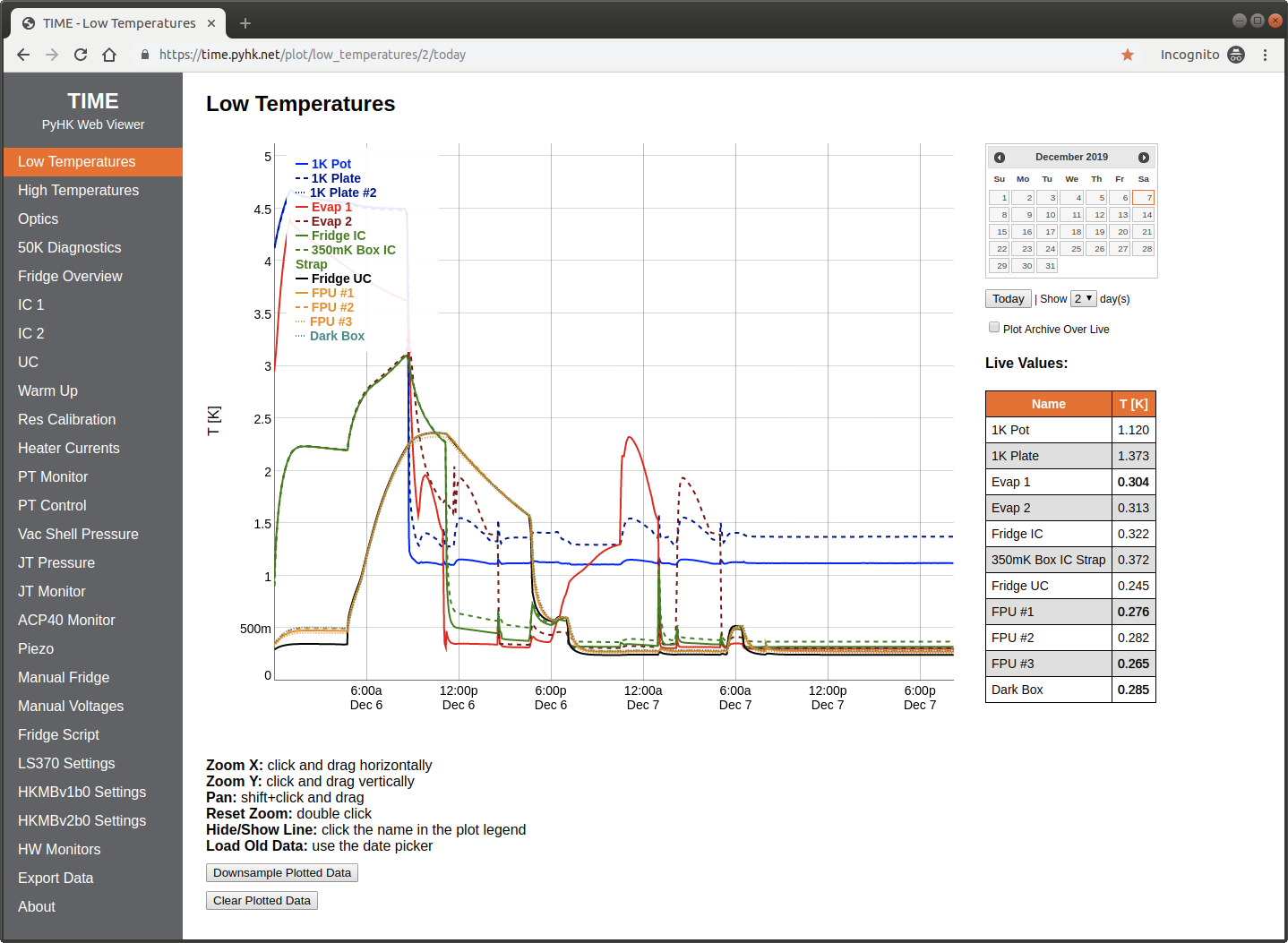
Identifier: plot
An interactive plot showing live and archived values for a provided set of sensors. Values update every few seconds without needing to refresh the page. A date-picker allows for browsing of archival data.
Example:
{
    "page_title":"Low Temperatures",
    "page_type":"plot",
    "plots":
    [
        {
            "subfolder_label":"temperature",
            "log_scale":false,
            "names": ["1K Pot", "1K Plate", "Evap 1"],
            "colors": ["blue","darkblue","green"],
            "linestyles": ["solid","dashed","dotted"]
        }
    ]
}
Supported Parameters:
string
page_title– The user-facing title of the page. Spaces and capital letters are allowed, but other special characters should be avoided. Slashes are not supported. All pages should have a unique title.list
plots– A list of one or more objects, each describing a plot to display on this page. (Multiple plot objects on one page share an x axis and should be considered a beta feature; this mode is not as well tested as single plots.) Plot object parameters are as follows:string
subfolder_label– The channeltypeparameter to display for this plot.boolean
log_scale– Iftrue, a log scale is used for the y axis. Otherwise, a linear scale is used.list
names– A list of channel names to display in this plot (matching channel names from thepyhkdconfiguration file).list
colors– A list (matchingnamesin length) of color names used when plotting the respective channels. All valid HTML color names are accepted.list
linestyles– A list (matchingnamesin length) of line style names used when plotting the respective channels. Valid entries aresolid,dashed, anddotted.string
units– Units to convert data to before plotting. For example, temperature data is stored internally in Kelvin, but can be displayed in Fahrenheit by settingunitstoF. Unit conversion functions can be found inpyhk/common/units/units.pyand have names of the forma2bwhereais the base unit string and is the string provided for theunitparameter (for the previous example, the functionK2Fis checked for and loaded).
Demonstration:
Tables
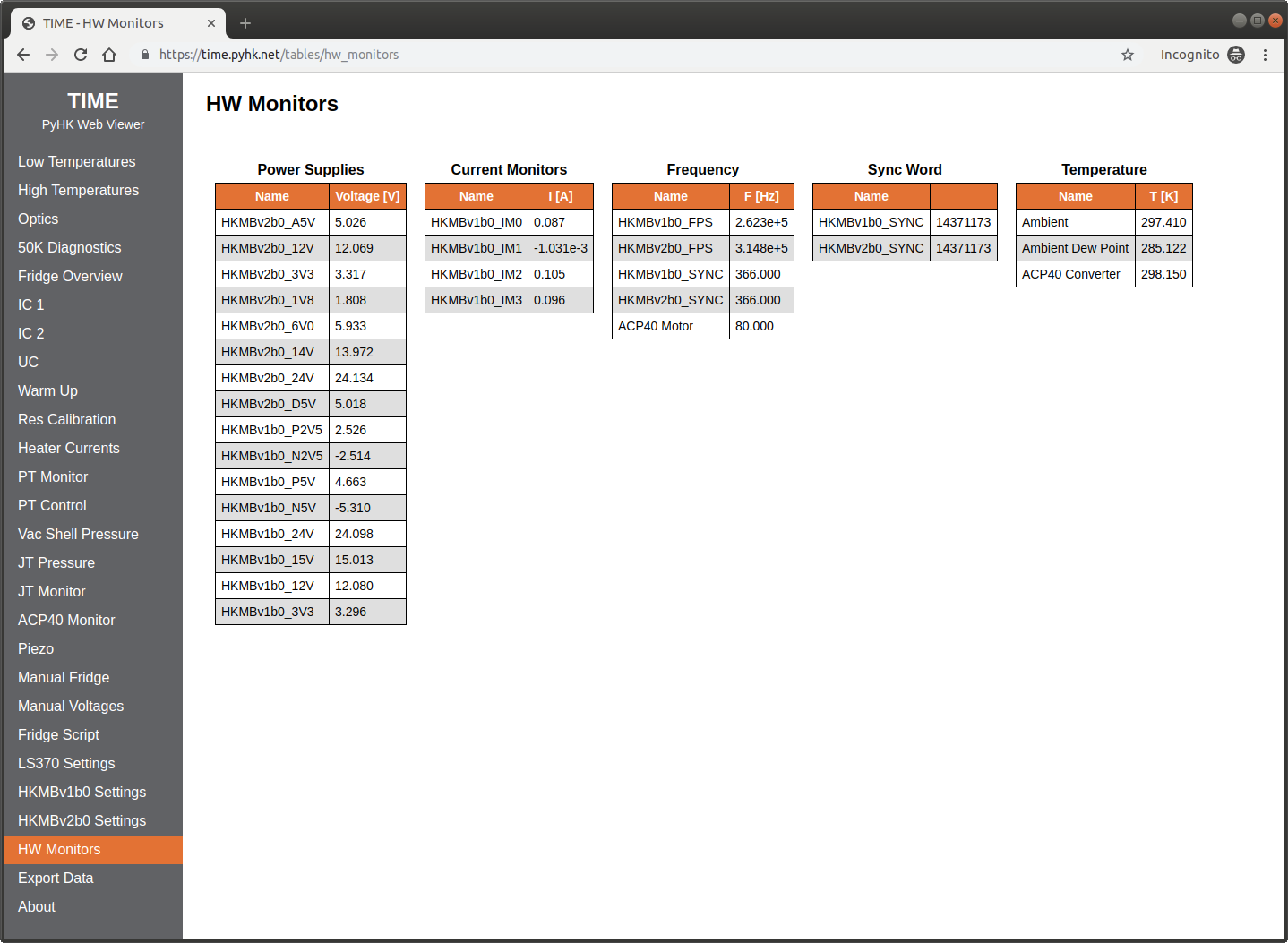
Identifier: tables
A set of one or more tables showing live values for a provided set of sensors. Values update every few seconds without needing to refresh the page.
Example:
{
    "page_title":"HW Monitors",
    "page_type":"tables",
    "tables":
    [
        {
            "title": "Power Supplies",
            "subfolder_label":"voltage",
            "names": ["HKMBv2b0_A5V","HKMBv2b0_12V","HKMBv2b0_3V3"]
        },
        {
            "title": "Temperature",
            "subfolder_label":"temperature",
            "names": ["Ambient","Ambient Dew Point"]
        }
    ]
}
Supported Parameters:
string
page_title– The user-facing title of the page. Spaces and capital letters are allowed, but other special characters should be avoided. Slashes are not supported. All pages should have a unique title.list
tables– A list of one or more objects, each describing a table to display on this page. Table object parameters are as follows:string
title– The title do display above the table.string
subfolder_label– The channeltypeparameter to display for this table.list
names– A list of channel names to display in this table (matching channel names from thepyhkdconfiguration file).
Demonstration:
Cryomech PT Compressor Control
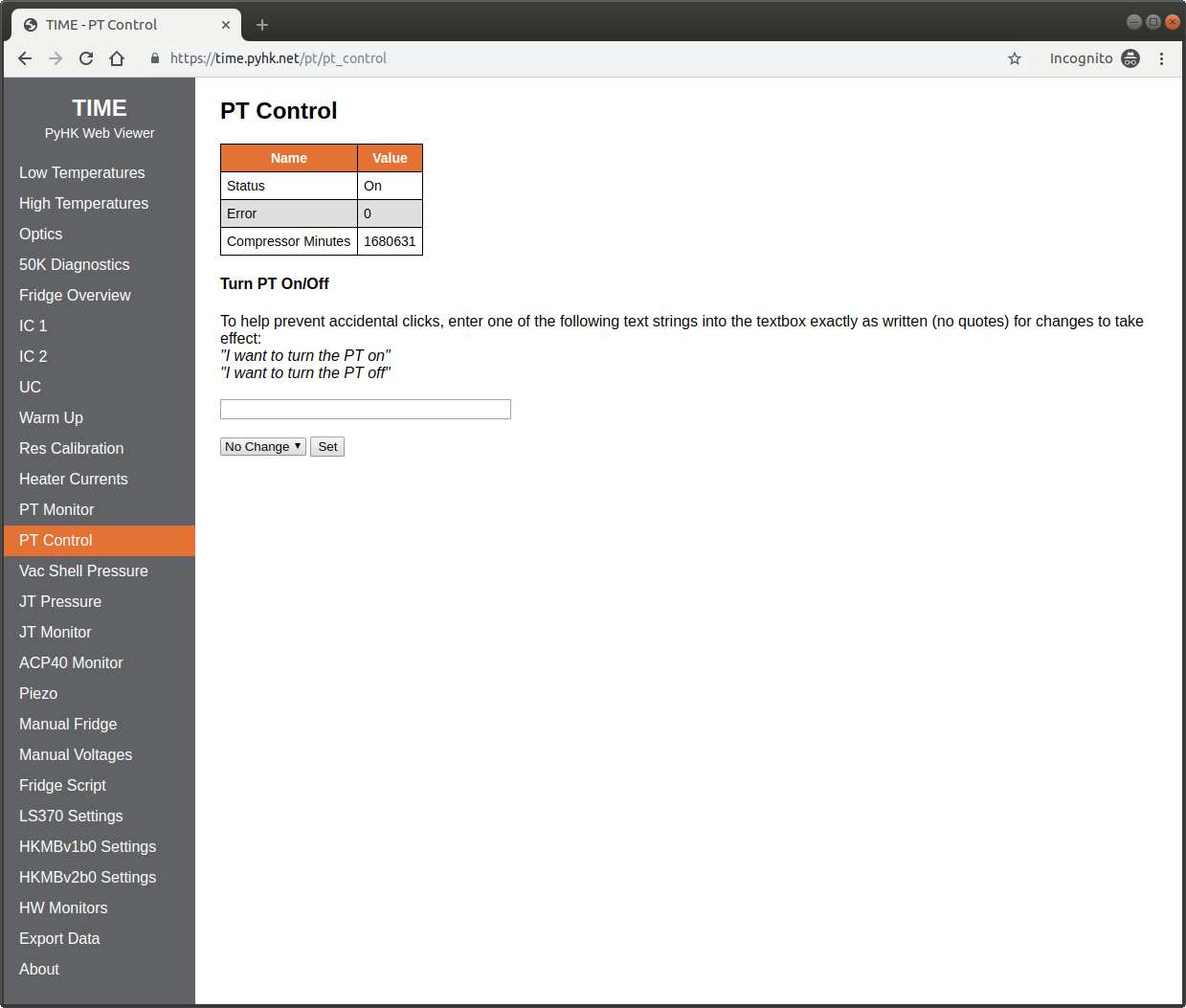
Identifier: pt
A control panel that allows remote operation of a Cryomech PT410 or PT415 helium compressor.
Example:
{
    "page_title":"PT Control",
    "page_type":"pt",
    "name_prefix":"PT"
}
Supported Parameters:
string
page_title– The user-facing title of the page. Spaces and capital letters are allowed, but other special characters should be avoided. Slashes are not supported. All pages should have a unique title.string
name_prefix– The value ofname_prefixprovided to the correspondingptcompressorinstrument inpyhkd.
Demonstration:
Voltage Control Panel
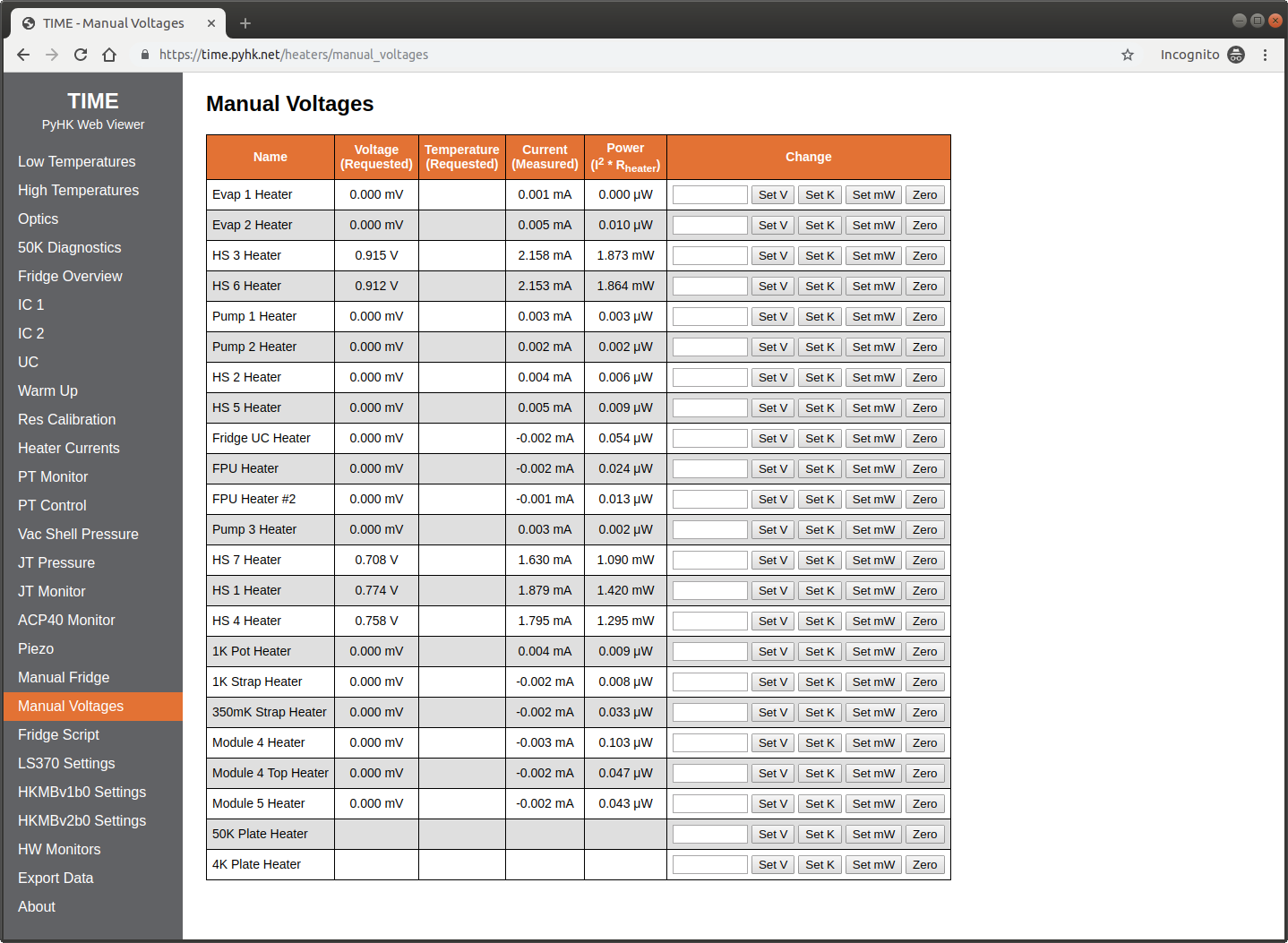
Identifier: heaters
A basic control panel for a provided list of voltage outputs.
Example:
{
    "page_title":"Manual Voltages",
    "page_type":"heaters",
    "use_power":true,
    "names": ["Evap 1 Heater", "Evap 2 Heater", "HS 3 Heater", "HS 6 Heater"]
}
Supported Parameters:
string
page_title– The user-facing title of the page. Spaces and capital letters are allowed, but other special characters should be avoided. Slashes are not supported. All pages should have a unique title.list
names– A list of voltage channel names to display controls for. For controls to work, names must match those provided in thepyhkdconfiguration file.boolean
use_power– Iftrue, allow the display and setting of power in addition to the voltage. Defaults tofalse. Powers are computed from the providedr_heaterandr_totalprovided for the channel in thepyhkdconfiguration file.boolean
use_temperature– Iftrue, allow the display and setting of temperature in addition to the voltage. Defaults tofalse. Requires the instrument to support PID functions.
Demonstration:
Custom Panel
Identifier: panel
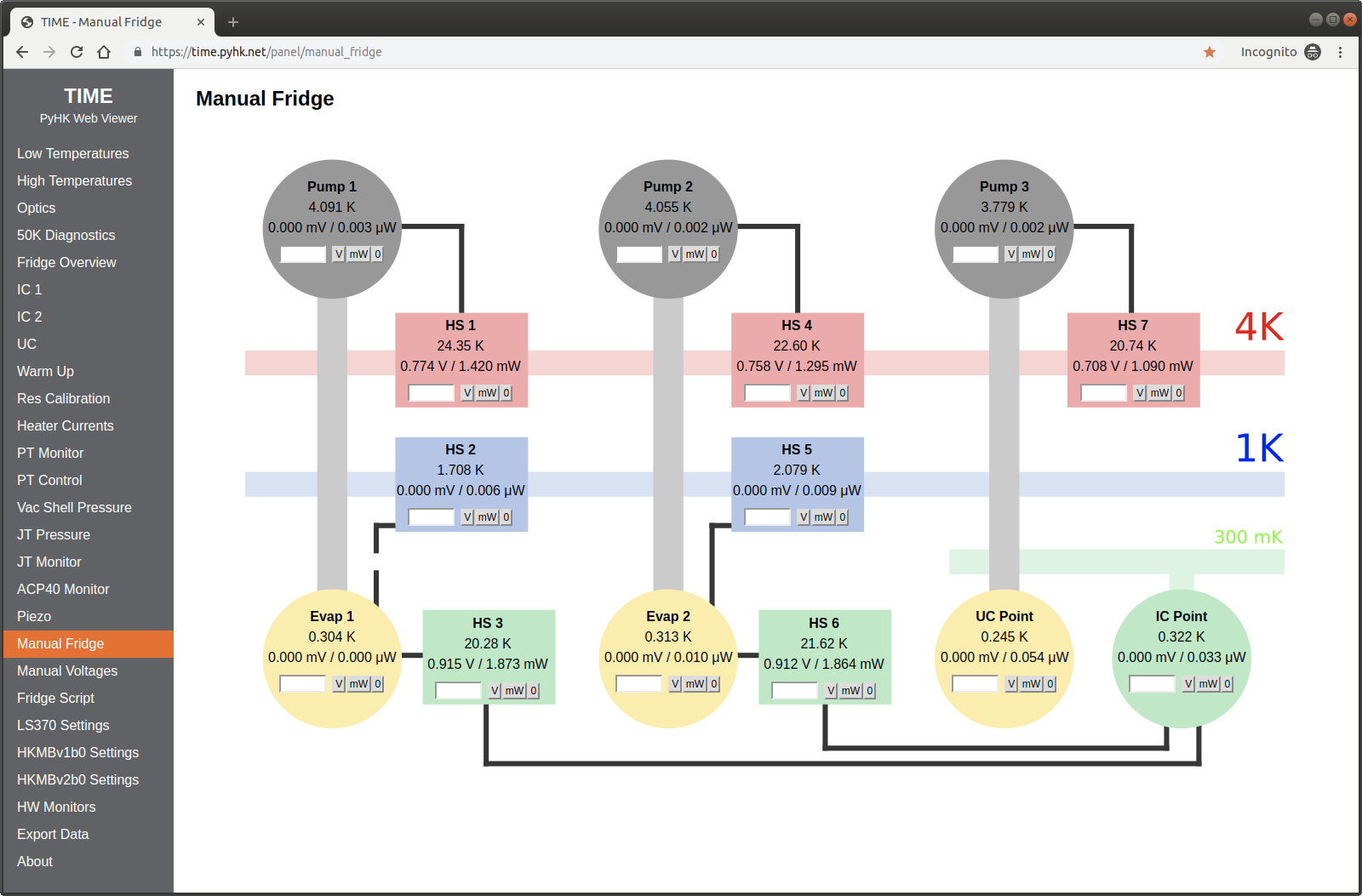
A custom heater/thermometer monitor and control panel. A series of “widgets” that control one heater are displayed over a static background image.
Example:
{
    "page_title":"Manual Fridge",
    "page_type":"panel",
    "background":"time-fridge-panel.png",
    "use_power":true,
    "widget_width":150,
    "widget_height":100,
    "widgets": [
        {
            "widget_type":"heater_control",
            "label":"HS 1", "name_v":"HS 1 Heater",
            "name_t":"HS 1", "xpos":236, "ypos":222
        },
        {
            "widget_type":"heater_control",
            "label":"HS 2", "name_v":"HS 2 Heater",
            "name_t":"HS 2", "xpos":236, "ypos":368
        },
        {
            "widget_type":"value",
            "subfolder_label":"temperature",
            "name":"4K Head", "xpos":710, "ypos":279
        }
    ]
}
Supported Parameters:
string
page_title– The user-facing title of the page. Spaces and capital letters are allowed, but other special characters should be avoided. Slashes are not supported. All pages should have a unique title.string
background– The file name (not path) of the background image to display behind the panel. Images should be stored inpyhk/pyhkweb/static/.boolean
use_power– Iftrue, allow the display and setting of power in addition to the voltage. Defaults tofalse. Powers are computed from the providedr_heaterandr_totalprovided for the channel in thepyhkdconfiguration file.integer
widget_width– The bounding box width for a single widget, measured in pixels.integer
widget_height– The bounding box height for a single widget, measured in pixels.list
widgets– A list of widget objects to display on the panel. Widget parameters are as follows:string
widget_type–heater_controlfor a heater control widget, orvaluefor a simple sensor valueinteger
xpos– Horizontal position of the widget with respect to the background image (measured in pixels).integer
ypos– Vertical position of the widget with respect to the background image (measured in pixels).string
label– Valid forheater_controlwidgets only. The user-facing widget label, displayed at the top of the widget.string
name_v– Valid forheater_controlwidgets only. The name of voltage channel for the widget (should match one of the channel names from thepyhkdconfiguration file)string
name_t– Valid forheater_controlwidgets only. The name of temperature channel for the widget (should match one of the channel names from thepyhkdconfiguration file)string
name– Valid forvaluewidgets only. The name of sensor channel for the widget (should match one of the channel names from thepyhkdconfiguration file)string
subfolder_label– Valid forvaluewidgets only. The sensor type to display (e.g.temperature,pressure, etc.)
Demonstration:
Fridge Script Control Panel
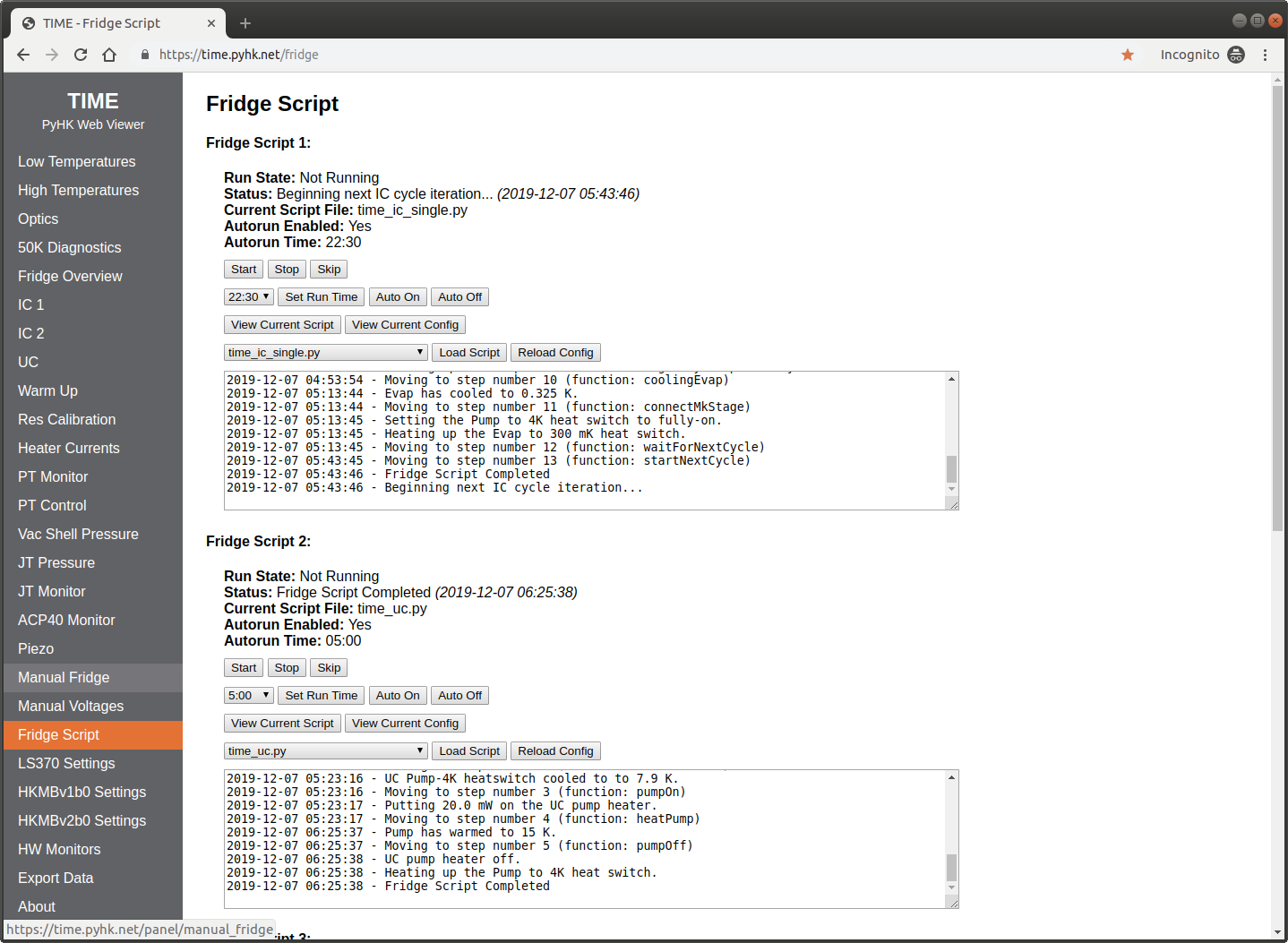
Identifier: fridge
Allows user control of any currently running instances of
pyhkfridge, which are auto-detected.
Example:
{
    "page_title":"Fridge Script",
    "page_type":"fridge"
}
Supported Parameters:
string
page_title– The user-facing title of the page. Spaces and capital letters are allowed, but other special characters should be avoided. Slashes are not supported. All pages should have a unique title.
Demonstration:
Lake Shore 370 Settings
Identifier: ls370
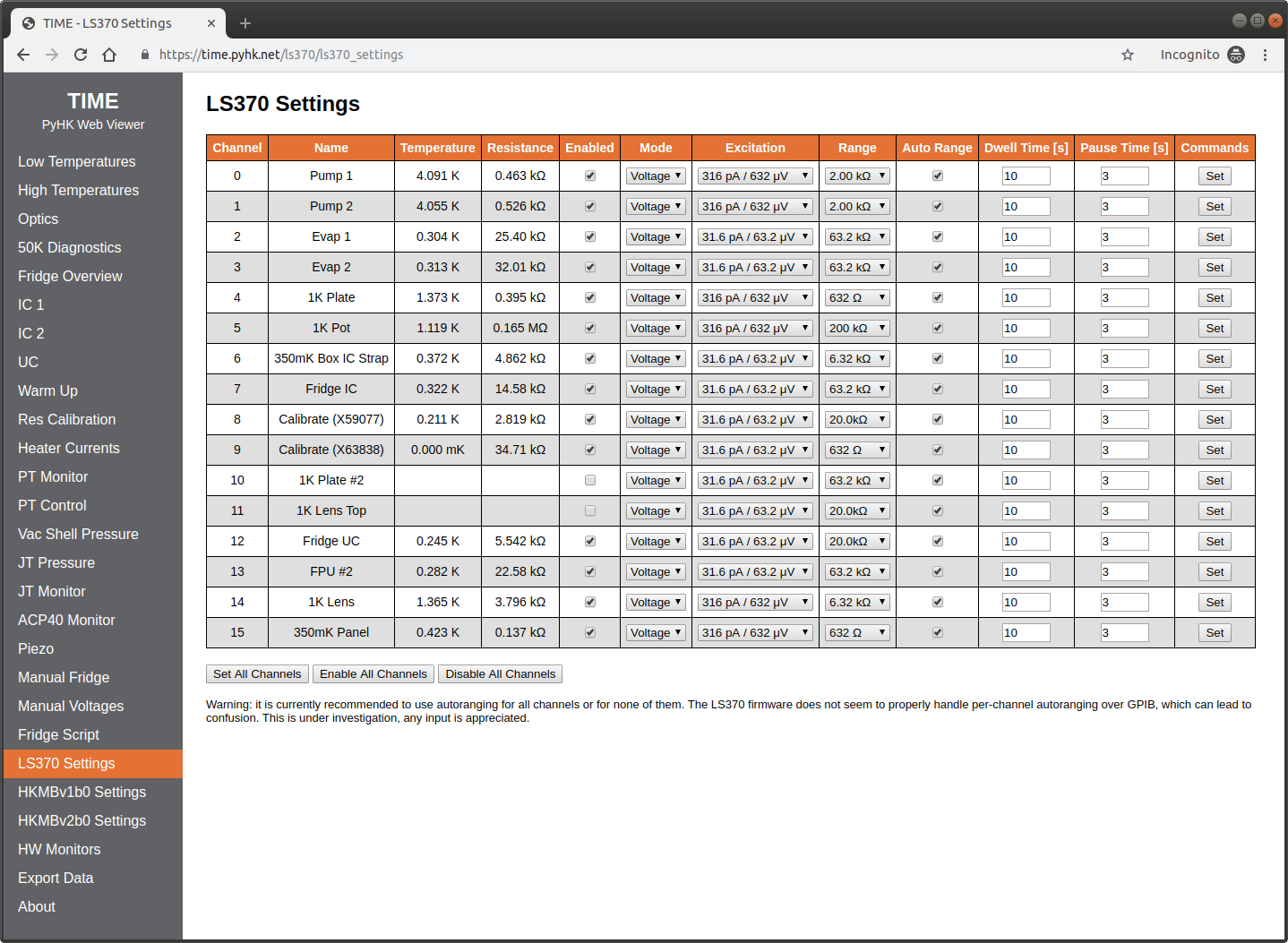
User-modifiable settings for a Lake Shore 370.
Example:
{
    "page_title":"LS370 Settings",
    "page_type":"ls370",
    "filename":"ls370_time.json"
}
Supported Parameters:
string
page_title– The user-facing title of the page. Spaces and capital letters are allowed, but other special characters should be avoided. Slashes are not supported. All pages should have a unique title.string
filename– The file name (not path) of the Lake Shore 370 auto-generated configuration file, as specified in thepyhkdconfiguration file.
Demonstration:
HKMB Settings
Identifier: hkmb
User-modifiable settings for one of the HKMB family of instruments (v2, v1, or v1 mini).
Example:
{
    "page_title":"HKMBv1b0 Settings",
    "page_type":"hkmb",
    "filename":"hkmbv1_time.json"
}
Supported Parameters:
string
page_title– The user-facing title of the page. Spaces and capital letters are allowed, but other special characters should be avoided. Slashes are not supported. All pages should have a unique title.string
filename– The file name (not path) of the HKMB auto-generated configuration file, as specified in thepyhkdconfiguration file.
Data Export
Identifier: export
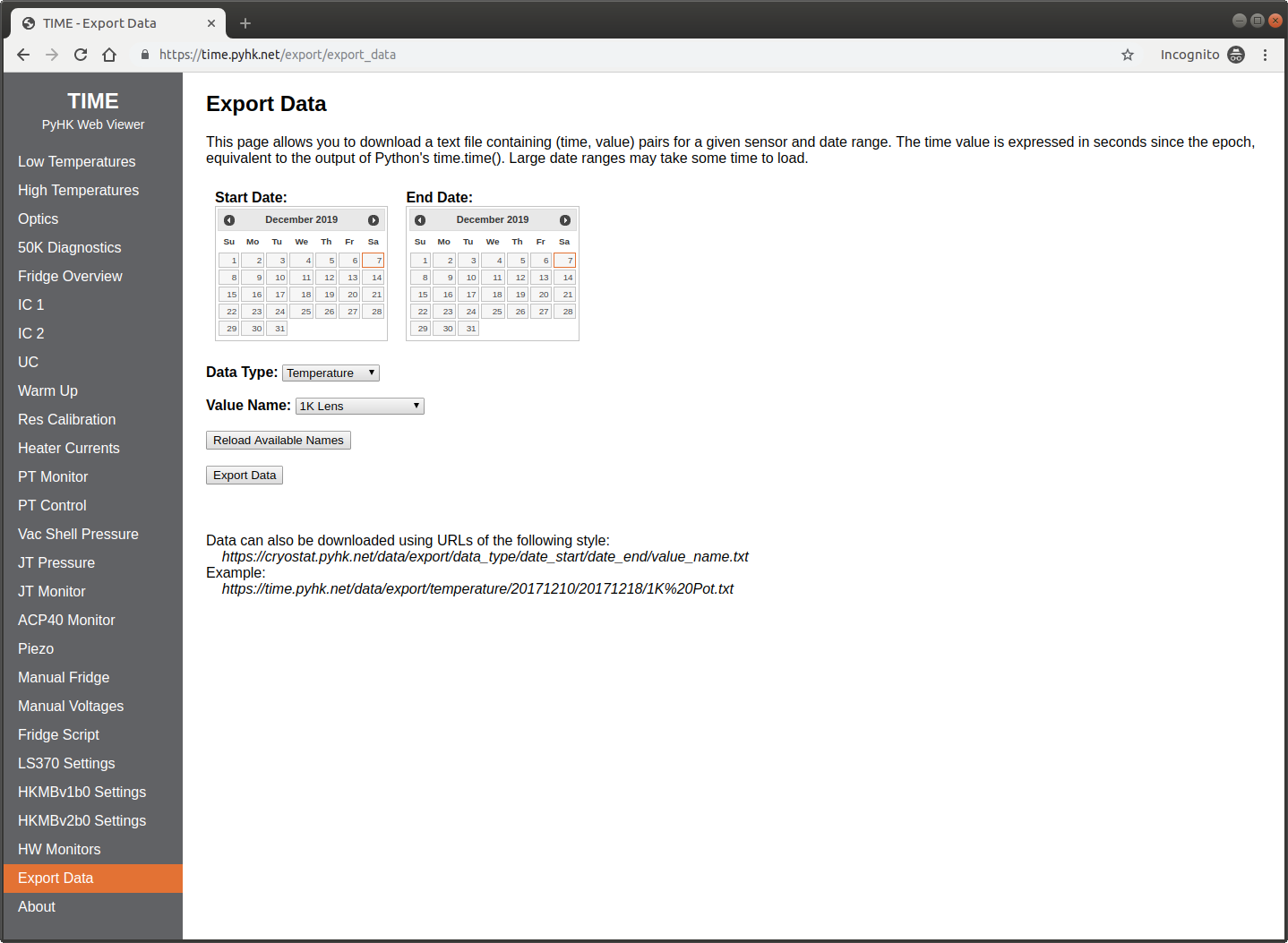
A page that allows exporting of any timestream data over a provided date range.
Example:
{
    "page_title":"Export Data",
    "page_type":"export"
}
Supported Parameters:
string
page_title– The user-facing title of the page. Spaces and capital letters are allowed, but other special characters should be avoided. Slashes are not supported. All pages should have a unique title.
Demonstration:
Virtual Pages
Internal Settings
Identifier: internal_settings
An optional virtual page containing site-wide settings. No actual page
is generate, and no page_title should be provided.
Example:
{
    "page_type":"internal_settings",
    "maintenance_mode": false,
    "site_name": "TIME"
}
Supported Parameters:
string
site_name– A short string displayed in the upper left corner of the website. This helps to differentiate multiple systems running PyHK.boolean
maintenance_mode– Iftrue, a warning banner is shown at the top of the website indicating that the site is undergoing maintenance. The site continues to function normally.
Fridge Scripts
pyhkfridge script files are Python files stored in
pyhk/pyhkfridge/scripts that define a set of rules for moving
between states. The main state variable of a running script is the
current step index, which maps directly to a function you have written.
These functions, called “steps”, should be quick segments of code
(executing in less than a second) that consult a series of values (time,
temperature, etc.) and decide to either (A) remain at the current step
index or (B) move to a different step index. Steps may also change other
system state variables (voltages, etc.). Every few seconds
pyhkfridge executes the current step function; this is repeated
until the script terminated.
Each script should define a class named FridgeScript that inherits
from FridgeScriptBase.
TODO: Document all functions
Example:
# pyhkfridge demo script.  This does not show all of the
# features, just a basic set.  (I encourage you to look
# at, for example, the TIME or SK fridge cycles if you
# are interested in more advanced features.)

import datetime
import numpy as np
import time

from pyhkfridgelib.fridge_script_base import *

# All fridge scripts must implement a class named FridgeScript
# that inherits from FridgeScriptBase
class FridgeScript(FridgeScriptBase):

    # One can define any global constants here
    THERMOMETER_NAME = "4K Head"
    HEATER_NAME = "FPU Heater"

    # FridgeScript.get_steps() should return a list of
    # functions that define the steps in order.  They
    # can have arbitrary names, and functions can be
    # reused for different steps. Each step should
    # be a quick operation that returns in no more
    # than ~5 seconds.  The current step is called
    # at most once per second until the controller
    # is told to switch steps.
    def get_steps(self):
        # Note: functions should be named something more descriptive!
        return [self.do_a_thing,
            self.wait_to_cool,
            self.step2,
            self.step_heater_wait,
            self.step4]

    # This is the first step (because it is the first
    # step in the list returned by get_steps(), NOT
    # because of its name).
    def do_a_thing(self):

        # Here I add a message to the log file.  This shows
        # under "Status" on the fridge control webpage,
        # and is added to the log.  The log is saved and
        # is viewable on the website.
        self.show_status('Starting demo, turning off heater ' + self.HEATER_NAME)

        # Set a voltage to 0V.  Check fridge_script_base.py
        # for other available set functions (like set_power).
        self.set_voltage(self.HEATER_NAME, 0.0)

        # Tell the fridge script controller to move to
        # the next step.  This step will not be called
        # again.  In this case, wait_to_cool is the
        # next step and will be called in ~1 sec.
        self.move_to_next_step()

    # This is the second step
    def wait_to_cool(self):

        # Here I check a temperature.  Check fridge_script_base.py
        # for other available get functions (like get_voltage).
        t = self.get_temperature(self.THERMOMETER_NAME)

        # Show a status message without adding it to the log.
        # This helps keep the log from being cluttered with
        # messages that get repeated a lot.
        self.show_status('Waiting on temperature, currently %f...' % t, add_to_log=False)

        # We only call move_to_next_step after a certain condition
        # is met.  This means that this function (wait_to_cool)
        # will be called repeatedly (about once per second)
        # until the condition is met.  Because the function
        # returns between each check, the script controller
        # is able to stop/skip the step and update the status.
        # If you do an infinite loop here (if the function never
        # returns), the script will work but the control interface
        # will appear to be frozen.
        if t < 10:
            self.show_status('Temperature goal reached')
            self.move_to_next_step()


    def step2(self):

        self.show_status('Turning on heater')
        self.set_voltage(self.HEATER_NAME, 0.1)
        self.move_to_next_step()

    # Pause 5 min in a way that shows the user the time countdown
    @pause_cycle(duration_seconds = 5*60)
    def step_heater_wait(self, time_remaining="?"):
        self.show_status('Waiting 5 min with the heater on...  (' + str(int(time_remaining)) + ' sec remaining)', add_to_log=False)

    def step4(self):

        self.show_status('Turning heater off.')
        self.set_voltage(self.HEATER_NAME, 0.0)

        self.show_status('Demo complete!')

        # There is no next step, so moving to the next
        # step causes the cycle to complete (successfully)
        self.move_to_next_step()